How to compress a PDF to a specific size
Upload forms often say "maximum 200 KB" or "no larger than 4 MB". Here's how to hit a limit like that, why no tool can make a file exactly a given size, and how to keep the result readable.
By the PDF ProMaster team · Fact-checked 27 October 2026
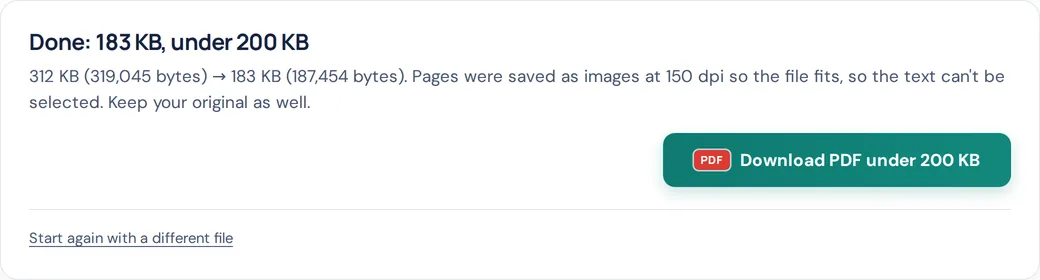
Quick answer: open Compress PDF, choose Exact size, and pick or type your limit. The tool makes a version that fits under it and shows the final size in bytes. If it can't fit, it tells you, and offers the smallest version it managed.
Why "exactly 100 KB" isn't possible
A PDF's size depends on its content: how many pages, how much text, how big and detailed the pictures are. Compression works in steps (a lower resolution, a stronger image setting), and each step changes the size by an amount you can't fully predict. So compression can't land on an exact size.
What an upload form actually needs is a file at or under the limit. That's achievable, and it's what Exact size is built for.
How Exact size works
When you choose a limit, PDF ProMaster runs these steps in your browser:
- Is it already small enough? If your file is already under the limit, you're told so, and there's nothing to download.
- Try to keep the text. It first re-saves the file without redrawing anything. If that fits, the text stays selectable and searchable.
- Find the sharpest version that fits. If not, it redraws each page as an image, starting sharp (150 dpi) and stepping down to 50 dpi, testing several quality settings at each step. It keeps the highest resolution that fits, at the best quality that fits at that resolution.
- Leave a safety margin. It aims about 2% under your number, so a site that rounds sizes differently won't reject it.
- Tell you if it can't. If even the smallest version it tries (50 dpi) is too big, you'll see its size and suggestions, such as splitting the file.
Exact size works on PDFs of up to 200 pages at a time. Longer files can be split first.
KB, MB and what a limit really means
Some systems count 1 KB as 1,000 bytes, others as 1,024. PDF ProMaster counts 1 KB as 1,000 bytes, so a file it makes "under 100 KB" is under 100,000 bytes and passes either way. For megabyte limits, type the size in KB: 1 MB is 1,000 KB, so for a 4 MB limit type 4000, or 3900 to be extra safe.
Step by step
- Open Compress PDF and choose your PDF. It stays on your device.
- Choose Exact size.
- Pick 100 KB, 200 KB, 300 KB, 500 KB, 1 MB or 2 MB, or choose "Another size…" and type your limit in KB (at least 20 KB).
- Press Compress PDF and wait while it tests the settings. Long files take longer, because every page is redrawn.
- Check the result: open it, zoom in, and make sure every page can still be read.
Quick links for common limits: under 100 KB, under 200 KB and under 500 KB.
Tips when the limit is very small
- Remove pages you don't need. Every page takes space, so a two-page file fits a small limit far more easily than a ten-page one.
- Crop the margins. A phone photo of a document often includes the table it was lying on. Crop PDF hides the edges; the file only gets smaller once Exact size redraws the pages. Cropping hides content rather than deleting it, so don't rely on it to remove private details.
- Split the document with Split PDF if the form accepts several files.
- Re-scan at 200 dpi (300 only for very small print), and in greyscale if colour isn't needed.
What you give up
When pages are redrawn as images to fit a limit, the text can be read but not selected, copied or searched. The tool tells you when this happens. Keep your original file, and only upload the compressed one where the size limit requires it.
Questions
Can I compress a PDF to exactly 100 KB?
Compression can't land on an exact size, because it changes the size in steps. What forms need is a file at or under the limit, and Exact size makes the sharpest version that fits under it.
How small can PDF ProMaster make a PDF?
You can set a limit as low as 20 KB. Whether a file fits depends on how many pages it has and what's on them. If it can't fit, the tool tells you the smallest size it reached, so you can decide whether to split the file instead.
Why can't I select the text after compressing?
To fit a tight limit, pages are often redrawn as images. The words remain readable but aren't stored as text any more. If the light re-save fits the limit, the text is kept.
Is my PDF uploaded to compress it?
No. The whole process runs in your browser on your own device.
How do I compress a PDF to 4 MB or 5 MB?
Choose Exact size, pick "Another size…" and type 4000 or 5000 (1 MB is 1,000 KB). Typing slightly less, such as 3900, adds a safety margin.
Try these tools
How we write our guides: every rule, limit and price is checked against the official page linked under Sources, on the date shown. Instructions describe only features our tools actually have. Spotted something out of date? Tell us and we'll correct it.