PDF too big to email? How to get under the attachment limit
Gmail, Outlook.com and Yahoo Mail all stop at 25 MB per email. Here's how to get a PDF under that, and what to do when compressing isn't enough.
By the PDF ProMaster team · Fact-checked 27 October 2026
Quick answer: open Compress PDF, choose Exact size and type a limit a little under your email's cap, for example 20 MB (20,000 KB) for Gmail. If it still won't fit, split the PDF into two emails with Split PDF.
Attachment limits for the main email services
| Service | Limit | What happens with bigger files |
|---|---|---|
| Gmail (personal) | 25 MB of attachments when sending | Gmail takes the attachment off and adds a Google Drive link instead |
| Outlook.com | 25 MB per email, counting the message text and images too | Microsoft suggests compressing the file or sharing a OneDrive link |
| Yahoo Mail | 25 MB in total for all attachments | Applies to sending and receiving |
| Work or school email (Google Workspace, Microsoft 365) | Set by your organisation | Microsoft 365 defaults to 35 MB to send (a little less in Outlook on the web), and admins can change it |
Checked on 27 October 2026 on each provider's help pages (see Sources). The person you're emailing may have a lower limit than you, so aim well under it.
Aim for about 20 MB rather than 25 MB. That leaves room for the message itself and any other attachments (Outlook.com counts everything in the email), and the person you're emailing may have a lower limit than you.
Option 1: Compress the PDF
- Open Compress PDF and choose your file. It's opened on your device and isn't uploaded.
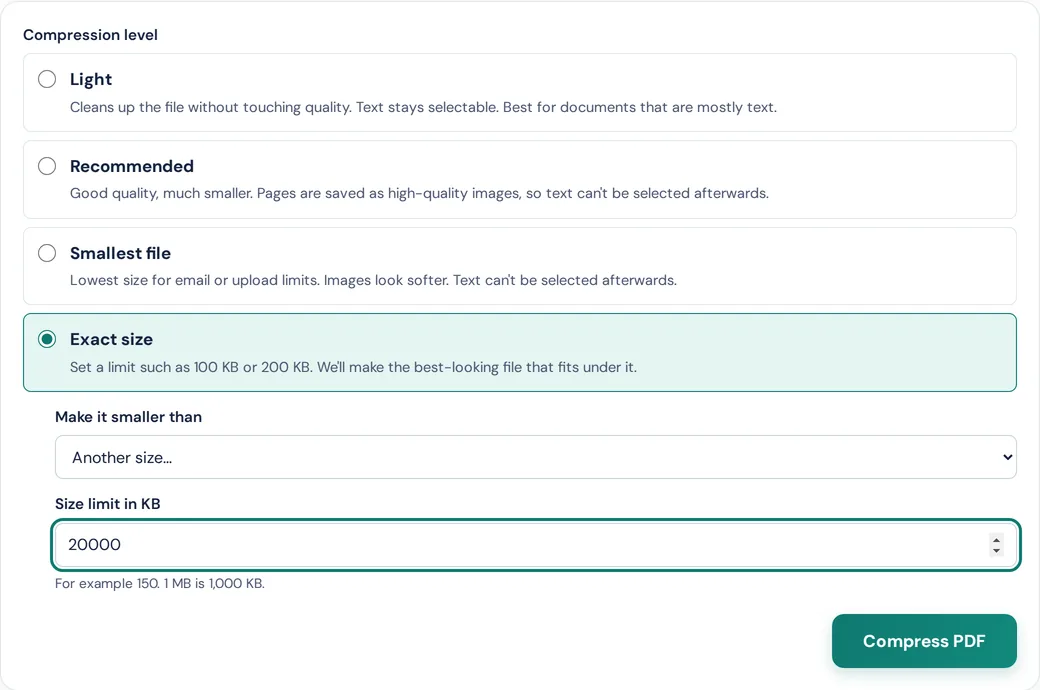
- Choose a level:
- Light keeps the text selectable and removes waste inside the file. Best for documents that are mostly text.
- Recommended or Smallest file redraw each page as an image. They shrink scans and photo-heavy files the most, but the text can't be selected afterwards.
- Exact size lets you choose the limit. The list goes up to 2 MB, so for email choose "Another size…" and type 20000 (1 MB is 1,000 KB). Exact size handles up to 200 pages at a time; for longer files, use Smallest file or split the PDF first.
- Download the result. The tool shows the old and new sizes, so you can check it's under the limit before you attach it.
Scanned documents and PDFs full of photos usually shrink the most. A PDF made from a Word document with no pictures is often small already, so if yours is huge, it probably contains large images. Our guide How to compress a PDF to a specific size explains how Exact size picks the best quality that fits.
Option 2: Split it into two or more emails
If the PDF must stay sharp, or it's still too big after compressing, send it in parts:
- Open Split PDF and choose your file.
- Choose page ranges, for example
1-40, 41-80. - Download the parts (they come as a ZIP if there are several) and attach one to each email, numbered "Part 1 of 2" and so on.
Pages are copied exactly when you split, so nothing loses quality.
Option 3: Remove what you don't need
Blank pages, duplicate scans and full-colour cover pages add size for nothing. Take them out with Delete PDF pages, or do everything at once in the PDF ProMaster Workspace: delete pages, add compression and download one file.
Option 4: Send a link instead
For very large files, a link is the practical answer. Gmail does this for you with Google Drive, and Outlook.com suggests OneDrive. Bear in mind that this puts a copy of the file in cloud storage, so check who the link is shared with if the document is private.
Still won't send?
- Check the total: several attachments add up, and the limit is for the whole email.
- Ask the recipient for their limit. Some company mail servers accept less than 25 MB.
- If the document is mostly scanned pages, re-scan it: 200 dpi is plenty for most documents (300 only for very small print), and far smaller than 600 dpi.
Questions
What is the maximum PDF size I can email?
Gmail, Outlook.com and Yahoo Mail allow 25 MB per email. Aim for around 20 MB to leave room for the message and in case the recipient's limit is lower. Work and school accounts can have different limits set by the organisation.
How do I make a PDF smaller for email without losing quality?
Try the Light level in Compress PDF first: it keeps text selectable and doesn't redraw pages. If that isn't enough, split the PDF into two emails rather than lowering the quality.
Will compressing my PDF upload it to a server?
Not with PDF ProMaster. Compression runs in your browser on your own device, so the file is never sent to us or anyone else.
Why does Gmail turn my PDF into a Drive link?
Gmail does this when the attachments are over 25 MB. Compress or split the PDF if you'd rather send it as a normal attachment.
Try these tools
How we write our guides: every rule, limit and price is checked against the official page linked under Sources, on the date shown. Instructions describe only features our tools actually have. Spotted something out of date? Tell us and we'll correct it.
Sources
- Gmail Help: Attachment size limits (checked 27 October 2026)
- Microsoft Support: Unable to attach files in Outlook.com (checked 27 October 2026)
- Yahoo Help: Attachment size limits (checked 27 October 2026)
- Microsoft Learn: Exchange Online limits (checked 27 October 2026)
Gmail and Google Drive are trademarks of Google LLC. Outlook, OneDrive and Microsoft 365 are trademarks of Microsoft Corporation. Yahoo is a trademark of Yahoo Inc. PDF ProMaster isn't affiliated with Google, Microsoft or Yahoo. PDF ProMaster is independent and isn't affiliated with, endorsed by or sponsored by it. Comparisons are based on the sources above; if anything here is out of date, please let us know and we'll correct it.