IRCC document upload: size limits and how to fix "file too large"
Canada's immigration portals reject files over 4 MB or 5 MB, depending on which one you use. Here are the limits, the accepted formats, and how to get your PDFs under them.
By the PDF ProMaster team · Fact-checked 27 October 2026
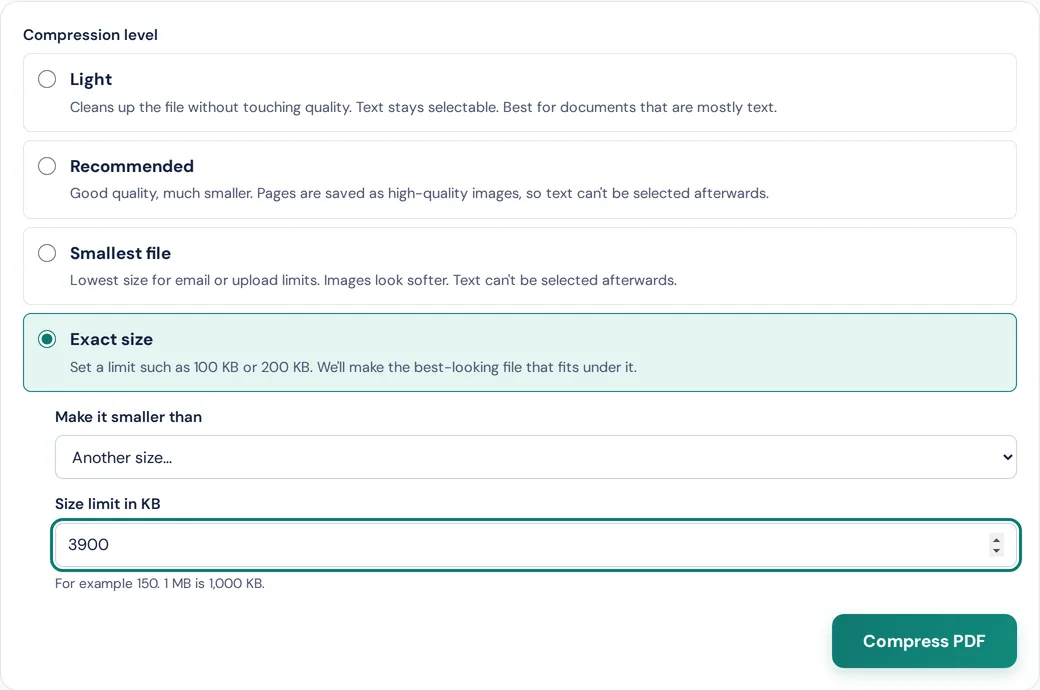
Quick answer: the IRCC Portal accepts files up to 5 MB. The IRCC secure account, online citizenship application, Asylum Portal and Permanent Residence Portal accept up to 4 MB. To fit, open Compress PDF, choose Exact size and type 3900 KB (or 4900 KB for the IRCC Portal).
IRCC file size limits by account
| Online account | Maximum per file | Accepted formats |
|---|---|---|
| IRCC Portal (including the new version) | 5 MB | .jpg, .png, .doc, .docx, .tiff, .pdf |
| IRCC secure account | 4 MB | .jpg, .png, .doc, .tiff, .pdf |
| Online citizenship application | 4 MB | .jpg, .jpeg, .png, .tif, .tiff, .pdf |
| Asylum Portal | 4 MB | .jpg, .png, .tiff, .doc, .docx, .pdf |
| Permanent Residence Portal | 4 MB | .pdf for application forms and supporting documents; also .jpg, .jpeg, .doc, .docx, .png |
From IRCC's Help Centre pages (modified 28 September 2026), checked on 27 October 2026. IRCC also warns that some limits can be as low as 2 MB, so always check the limit shown in your own application.
Why aim a little under the limit
A "4 MB" limit can mean 4,000,000 or 4,194,304 bytes, depending on how the system counts. PDF ProMaster counts 1 KB as 1,000 bytes and aims about 2% under whatever you type, so 3900 is comfortably under either.
How to get a PDF under 4 MB
- Open Compress PDF and choose your PDF. It's processed on your device, so your passport scans and bank statements aren't uploaded to us or anyone else.
- Choose Exact size, then "Another size…", and type 3900 (or the limit your application shows, minus a little).
- Press Compress PDF. The tool first tries to shrink the file while keeping its text selectable. If that isn't enough, it redraws the pages as images and picks the sharpest version that fits.
- Check the result. Open it and make sure every page is readable, then upload it.
If the tool tells you it can't get under the limit, the file has too many pages to fit at a readable quality. Split it into parts with Split PDF if your application allows more than one file for that document, or remove pages that aren't needed.
Several documents for one upload slot
Some upload slots expect one file, but your evidence is several scans or photos. Combine them first:
- Photos of documents: JPG to PDF turns them into one PDF, one page per photo.
- Several PDFs: Merge PDF joins them in the order you choose.
- Then compress the combined file to the limit, as above.
Our guide to combining documents into one PDF for an application walks through the whole process.
IRCC's own tips for smaller files
IRCC's Help Centre suggests a few things that also help before you compress:
- Scan at a lower resolution, and crop out empty space around the document.
- If you're saving from Word, use the PDF option for minimum size.
- Remove images you don't need, and convert TIFF or PNG scans to JPG.
Before you upload
- Make sure every page is readable after compressing. A file that fits but can't be read won't help your application.
- Keep your original, full-quality files.
- If a document isn't in English or French, check IRCC's instructions for translations.
PDF ProMaster isn't affiliated with Immigration, Refugees and Citizenship Canada, and this guide isn't immigration advice. Always follow the instructions in your own application and on IRCC's website.
Questions
What is the maximum file size for IRCC uploads?
5 MB per file for the IRCC Portal, and 4 MB for the IRCC secure account, online citizenship application, Asylum Portal and Permanent Residence Portal, according to IRCC's Help Centre. Some limits can be as low as 2 MB, so check your own application.
Does IRCC accept PDF files?
Yes. Every IRCC online account accepts PDF, and the Permanent Residence Portal asks for PDF for application forms and supporting documents.
How do I reduce a PDF to under 4 MB?
Open Compress PDF, choose Exact size, pick "Another size…" and type 3900. The tool aims just under that and shows the final size.
Is it safe to compress immigration documents online?
With PDF ProMaster, the compression happens in your browser on your own device, so your documents are never uploaded. With tools that process files on a server, check their privacy policy first.
My PDF is still too big after compressing. What now?
Remove unneeded pages, or split the document into parts if your application allows more than one file. Re-scanning at a lower resolution, such as 150 dpi, also helps.
Try these tools
How we write our guides: every rule, limit and price is checked against the official page linked under Sources, on the date shown. Instructions describe only features our tools actually have. Spotted something out of date? Tell us and we'll correct it.
Sources
- IRCC Help Centre: file size limits (checked 27 October 2026)
- IRCC Help Centre: accepted file types (checked 27 October 2026)
- IRCC Help Centre: files that are too large (checked 27 October 2026)