How to combine scanned documents into one PDF for an application
Applications for visas, jobs, loans and rentals often ask for your documents as one PDF, under a size limit. Here's how to go from a pile of photos, scans and Word files to one tidy file.
By the PDF ProMaster team · Fact-checked 27 October 2026
Quick answer: open the PDF ProMaster Workspace, add all your files (PDFs, photos and Word documents), drag the pages into order, delete anything you don't need, then press Merge & download. If the form has a size limit, compress the result with Compress PDF's Exact size option.
Before you start: check what the form wants
- One file or several? Some forms have one slot per document type; others want everything in one PDF.
- The size limit, per file and sometimes in total. For example, IRCC's portals allow 4 MB or 5 MB per file (some limits can be as low as 2 MB), and USCIS allows 6 MB.
- Accepted formats. PDF is almost always accepted; some forms also take JPG.
- The order they want, if they list one, such as passport first, then proof of address.
Step 1: Get every document into digital form
- Paper documents: scan them, or photograph them flat, in good light, with the whole page in view. Your phone's built-in document scanner (in the Notes app on iPhone, or Google Drive on Android) straightens pages for you.
- Word documents: .docx files can go straight into the Workspace. Older .doc files need opening in Word (or another word processor) and saving as .docx first. To convert one on its own, use Word to PDF.
- Photos: JPG, PNG, WebP, GIF and BMP images can be added directly, and each becomes a page. iPhone HEIC photos need sharing or saving as JPG first.
Step 2: Put them together in the Workspace
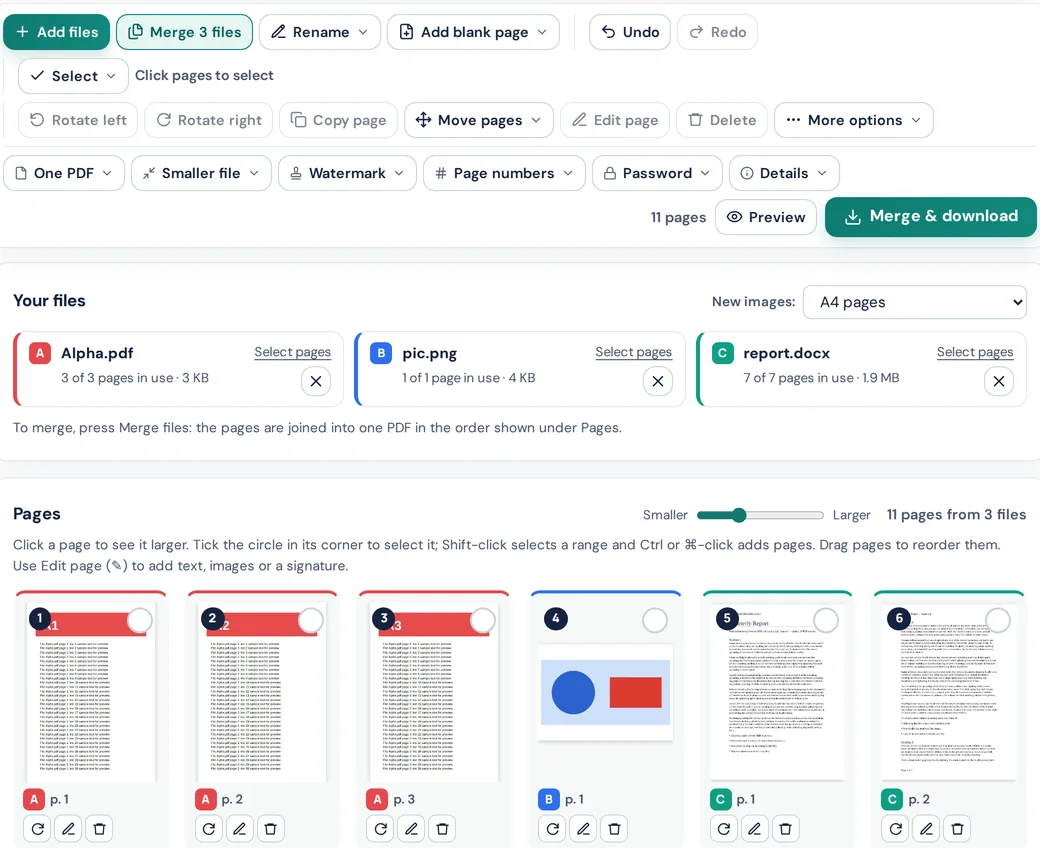
- Open the PDF ProMaster Workspace and add your files. You can add more at any time, and each file gets its own letter and colour.
- Drag the pages into the order the form asks for. Rotate any sideways photos.
- Delete blank or duplicate pages. Every extra page adds size.
- If you need to, add a signature, today's date or a short note with Edit page.
- Press Merge & download to save one PDF with the pages in the order shown.
Prefer simple tools? Use JPG to PDF for photos, then Merge PDF to join the PDFs.
Step 3: Get it under the size limit
Open Compress PDF, choose Exact size and enter the form's limit. For a 4 MB limit, choose "Another size…" and type 3900 to leave a safety margin. The tool keeps the sharpest version that fits, and tells you if it can't. Our guide on compressing a PDF to a specific size explains how it works.
Step 4: Check it before you upload
- Open the final PDF and look at every page: is everything readable, the right way up and in order?
- Make sure nothing private is included that the form doesn't ask for.
- Name the file clearly, for example
Surname-Firstname-proof-of-address.pdf, unless the form gives a naming rule.
Keeping private documents private
Application packs contain sensitive details: passport numbers, bank details, payslips. Every PDF ProMaster tool runs in your browser, so these documents are never uploaded to us or stored anywhere. When you close the tab, they're gone from the page. If you use other tools, check where they process your files and how long they keep them.
For copies you send to a landlord or agent, consider adding a watermark such as "For rental application only" with Watermark PDF.
PDF ProMaster isn't affiliated with any government department or application service, and this guide isn't legal or immigration advice. Always follow the instructions of the organisation you're applying to.
Questions
How do I put several documents into one PDF?
Add them all to the PDF ProMaster Workspace, arrange the pages, then press Merge & download. Or turn photos into a PDF with JPG to PDF and join PDFs with Merge PDF.
Can I combine photos and PDFs together?
Yes. The Workspace opens PDFs, images (JPG, PNG, WebP, GIF, BMP), Word (.docx) and text files together, and each image becomes a page.
How do I make the combined PDF small enough to upload?
Use Compress PDF's Exact size option and enter the form's limit, slightly under it for safety. If it can't fit, remove pages or split the file if the form allows several uploads.
Are my documents uploaded when I combine them?
No. The Workspace, Merge PDF and Compress PDF all run in your browser on your own device.
Can I open password-protected PDFs, like bank statements?
Yes, in the Workspace, if you know the password and are allowed to use the file. You'll see a password box next to the file.
Try these tools
How we write our guides: every rule, limit and price is checked against the official page linked under Sources, on the date shown. Instructions describe only features our tools actually have. Spotted something out of date? Tell us and we'll correct it.
Sources
- IRCC Help Centre: file size limits (checked 27 October 2026)
- USCIS: Tips for filing forms online (checked 27 October 2026)